QR Code Security & Safety: Protecting Yourself from Malicious Scans
Discover essential tips for QR code security and safety. Learn how to identify malicious QR codes and protect your personal data from phishing and malware attacks. Stay s
Secure? Navigating the Landscape of QR Code Security and Safety
QR codes have seamlessly woven themselves into the fabric of our daily lives. From restaurant menus and product packaging to public transit and payment systems, these pixelated squares offer instant access to a wealth of digital information with a simple scan. Their convenience is undeniable, bridging the physical and digital worlds in an efficient, user-friendly manner. But as their ubiquity grows, a critical question emerges for both users and creators: are QR codes truly secure?
The rapid adoption of QR codes has, unfortunately, also opened avenues for malicious actors to exploit their simplicity. The very ease with which they connect us to online content can be weaponized if proper precautions aren't taken. This comprehensive guide will delve deep into the nuances of QR code security, exploring the potential threats, offering practical advice for ensuring QR code safety, and empowering you to interact with this technology confidently.
What is a QR Code, and Why the Security Concern?
A QR (Quick Response) code is a two-dimensional barcode capable of storing a variety of data, most commonly a URL, text, contact information, or Wi-Fi login details. When scanned by a smartphone camera or a dedicated app, the data is instantly processed, usually leading to a website, an app download, or an action like sending an email.
The inherent "black box" nature of a QR code is precisely where the security concern arises. Unlike a visible URL where you can inspect the domain before clicking, a QR code's content is hidden until scanned. This lack of immediate transparency makes it an attractive vector for phishing, malware distribution, and various scams. While the QR code itself is just an encoded image and cannot "contain" a virus, it can point to malicious content or actions, making robust QR code security a paramount concern.
The Nature of QR Code Vulnerabilities
Understanding the vulnerabilities is the first step toward enhancing QR code security. Malicious actors leverage the trust users place in QR codes and the speed at which interactions happen. Here are the primary ways QR codes can be exploited:
- Malicious URL Redirection (Quishing): This is the most common threat. A legitimate-looking QR code might link to a deceptive website designed to steal credentials (phishing), install malware (drive-by download), or trick users into revealing personal information. These fake sites often mimic well-known brands, banks, or government services.
- Data Exposure and Information Theft: QR codes linking to vCard (contact details), Wi-Fi networks, or event information can be tampered with. A malicious vCard might inject harmful data into your contacts, or a fake Wi-Fi QR code could connect you to an insecure network where your data can be intercepted.
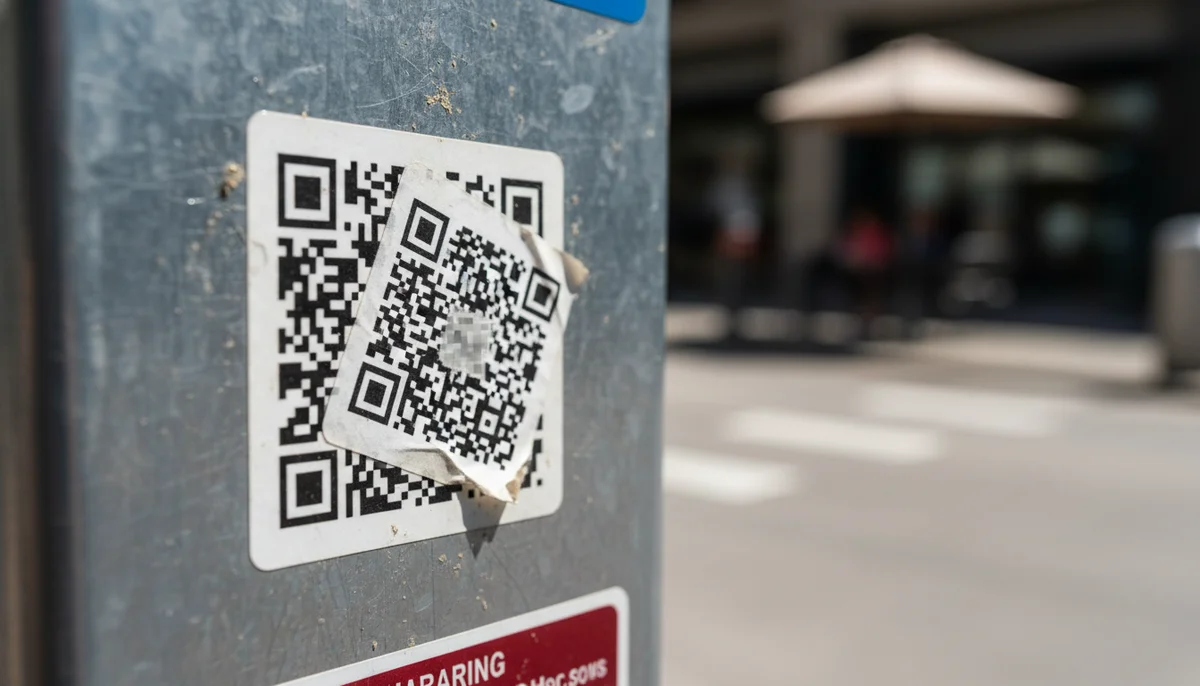
- Physical Tampering: In public spaces, legitimate QR codes can be covered with malicious stickers. This "sticker bombing" or "QR code overlay" makes users scan a fraudulent code instead of the intended one, often without realizing it.
- Lack of Transparency: As mentioned, you can't see the destination URL without scanning. This trust blind spot is a significant vulnerability that attackers exploit.
- Unauthorized Actions: Some QR codes can trigger actions beyond just opening a link, such as sending an SMS message or initiating a phone call. While useful for legitimate purposes, if controlled by an attacker, these could be used for premium-rate scams or spam.
Understanding QR Code Security Threats
Let's break down the specific types of threats you might encounter:
Phishing and Spear-Phishing via QR Codes
Known as "quishing," this is a sophisticated form of phishing. Attackers embed malicious URLs in QR codes that lead to fake login pages or websites designed to mimic legitimate ones. For example, a QR code appearing on an invoice might lead to a fraudulent payment portal, or one on an official-looking document could ask for your login credentials. These attacks are particularly effective because they bypass traditional email security filters.
Malware Distribution
A QR code can link directly to a file download containing malware or ransomware. Once downloaded and opened, this malicious software can compromise your device, steal data, or encrypt your files, demanding a ransom for their release.
Data Harvesting and Identity Theft
QR codes are increasingly used for surveys, sign-ups, and information collection. A malicious QR code could lead to a fake form designed to harvest personal identifiable information (PII) such as names, addresses, phone numbers, or even financial details. This information can then be used for identity theft or sold on the dark web.
Unsafe Wi-Fi Networks
A QR code designed to connect you to a Wi-Fi network can be convenient. However, a malicious Wi-Fi QR code could connect your device to an insecure or rogue network controlled by an attacker. On such a network, all your internet traffic could be intercepted, leading to data breaches.
Misinformation and Scams
Beyond direct technical attacks, QR codes can be used to spread misinformation, redirect users to scam websites selling fake products, or promote fraudulent investment schemes. While not a direct system breach, these can lead to significant financial loss or psychological distress.
Best Practices for Users: How to Scan Safely (QR Code Safety)
While the threats are real, you can significantly enhance your QR code safety by adopting a few simple yet effective habits.
-
Inspect Before You Scan:
- Source Verification: Always question the source of the QR code. Is it from a reputable business or organization? Does it look official? Be wary of QR codes found in unusual or unexpected places (e.g., random flyers, unsolicited emails, or social media posts from unknown accounts).
- Physical Tampering Check: If the QR code is on a physical surface, check for signs of tampering. Is there a sticker overlaying another code? Does the code look blurry or misaligned, suggesting it's been poorly pasted over an original?
- Contextual Awareness: Does the QR code make sense in its context? A QR code on a legitimate product package for product information is usually safe. A QR code on a random street lamp inviting you to "claim a prize" is highly suspicious.
-
Use a Trusted Scanner App with URL Preview: Many modern smartphone cameras have built-in QR code scanners. However, some dedicated QR code scanner apps offer an extra layer of QR code safety by displaying the destination URL before you navigate to it. Always check that the URL starts with
https://(indicating a secure connection) and that the domain name looks legitimate and belongs to the expected source. Avoid scanning apps that ask for excessive permissions (e.g., access to your contacts or microphone when it's not needed). -
Be Skeptical of Offers That Seem Too Good to Be True: Just like with email phishing, if a QR code promises an unbelievable prize, a huge discount, or an urgent warning that requires immediate action, proceed with extreme caution. These are classic social engineering tactics.
-
Keep Your Device Software Updated: Operating system and app updates often include critical security patches that protect against known vulnerabilities, including those that might be exploited via malicious links.
-
Use Security Software: While not a foolproof solution against all QR code threats, having reputable antivirus and anti-malware software on your device can add a layer of protection by identifying and blocking known malicious websites or downloads after you've scanned a QR code.
Best Practices for Creators: How to Deploy Secure QR Codes (QR Code Security)
For businesses, marketers, and individuals deploying QR codes, ensuring robust QR code security is not just about protecting your users; it's about protecting your brand reputation and avoiding legal liabilities.
-
Choose a Reputable QR Code Generator: Always use a trusted and secure QR code generator. Free, anonymous generators might not offer the security features or monitoring capabilities needed to manage QR codes safely. A professional platform provides better control, analytics, and often, dynamic capabilities.
-
Leverage Dynamic QR Codes for Enhanced Security: One of the most powerful tools for enhancing QR code security is the use of Dynamic QR Codes. Unlike static QR codes, whose destination URL is permanently embedded, dynamic QR codes use a short redirect URL. This means you can change the final destination link at any time, even after the QR code has been printed and distributed.
- Preventing Stale or Malicious Links: If your original destination page becomes compromised or outdated, you can quickly update the dynamic QR code to point to a secure or new location without reprinting. This is crucial for long-term campaigns and preventing security vulnerabilities from lingering.
- URL Monitoring: Reputable dynamic QR code providers often offer internal monitoring of the linked URLs, providing an early warning if a destination becomes flagged as malicious.
-
Ensure Your Destination Links Are Secure (HTTPS): Always link your QR codes to websites that use HTTPS (Hypertext Transfer Protocol Secure). This encrypts the connection between the user's browser and your server, protecting data in transit. Most modern browsers will flag or block connections to insecure HTTP sites, potentially deterring your users.
-
Regularly Monitor and Audit Your QR Codes: Especially for businesses with numerous deployed QR codes, regular audits are essential.
- Check Destination URLs: Periodically scan your own QR codes to ensure they still lead to the correct, secure destination.
- Monitor Analytics: Utilize tools like QR Code Analytics to track scan locations, frequency, and device types. Sudden spikes in scans from unusual locations or an unexpected drop can be indicators of tampering or misuse. This proactive monitoring helps in detecting security anomalies early.
-
Secure Physical Placement and Integrity: If deploying physical QR codes, choose secure locations. For high-stakes applications, consider using tamper-proof materials or methods to make it harder for malicious actors to overlay or replace your codes. Clearly brand your QR codes with your logo to make them more identifiable and harder for imposters to mimic.
-
Implement Team Controls for QR Code Management: For organizations, managing who can create, edit, and access QR code data is a critical security measure. A Team Workspace allows you to assign roles and permissions, ensuring that only authorized personnel can generate or modify QR codes. This prevents internal misuse, accidental errors, and maintains a clear audit trail of all QR code activities within your organization. This is especially important for large-scale deployments where multiple individuals or departments are involved in QR code campaigns.
-
Educate Your Audience: Inform your users about QR code safety best practices. Include a small disclaimer or tips near your QR codes on how to scan safely, reinforcing trust and responsibility.
Debunking Common Myths about QR Code Security
Let's clear up some misunderstandings that often circulate:
-
Myth: QR codes are inherently dangerous.
- Reality: QR codes themselves are not dangerous. They are simply a data transport mechanism. The danger lies in the content they link to or the actions they trigger. A well-managed QR code linking to a secure, legitimate site is perfectly safe.
-
Myth: Antivirus software will protect me from all QR code threats.
- Reality: While antivirus software is crucial for overall device security, it cannot always protect you from clever social engineering tactics or zero-day vulnerabilities. Many QR code scams rely on tricking you into voluntarily entering information or approving an action, which antivirus cannot prevent. Good user judgment and vigilance are your primary defenses.
-
Myth: All QR codes are permanent and unchangeable.
- Reality: This is only true for static QR codes. As discussed, Dynamic QR Codes offer the flexibility to change the destination URL at any time, making them a much more secure and adaptable option for long-term use and mitigating potential security risks.
The Role of Technology in Enhancing QR Code Security
As QR codes become more integral to our digital interactions, technology is evolving to make them safer:
- Advanced Scanner Apps: Modern scanner apps are increasingly incorporating features like real-time URL analysis, threat detection, and warnings before opening suspicious links. Some even integrate with reputable security databases to identify known malicious domains.
- Browser-Level Protections: Web browsers are also becoming smarter, with built-in phishing and malware detection that can block access to harmful sites even if you've scanned a malicious QR code.
- Backend Monitoring and AI: Reputable QR code generators and service providers often employ AI and machine learning algorithms to monitor patterns of QR code usage, detect unusual activity, and identify potentially malicious links proactively. This server-side security is a vital, unseen layer of protection.
Conclusion
The question "Secure?" is a valid and important one when it comes to QR codes. While the technology itself is neutral, the content it points to and the manner in which it's deployed can introduce significant security risks. However, with awareness, diligent practices, and the right tools, both users and creators can navigate the QR code landscape with confidence.
For users, adopting a cautious mindset, scrutinizing QR code sources, and utilizing smart scanning practices are paramount for ensuring your personal QR code safety. For creators, embracing best practices such as using a reputable generator, employing Dynamic QR Codes for flexibility and control, leveraging QR Code Analytics for monitoring, and managing your QR code assets securely within a Team Workspace are essential steps to uphold strong QR code security, protect your brand, and build trust with your audience.
By staying informed and proactive, we can continue to enjoy the immense convenience QR codes offer, without compromising our digital security. Choose wisely, scan safely, and create securely!
Ready to Get Started?
Explore our tools to enhance your QR code workflow
Team Workspace
Collaborate with your team on QR code projects. Share templates, manage permissions, and track usage.
Explore TeamsDynamic QR Codes
Edit QR code destinations after printing. Track scans, A/B test URLs, and update content anytime.
Go DynamicAll tools are available with a free plan to get you started
Frequently Asked Questions
Find quick answers to common questions about this topic
What are the risks associated with scanning QR codes?
Scanning malicious QR codes can lead to phishing attempts, malware downloads, or redirection to harmful websites. Attackers can embed URLs that steal personal information or compromise your device, making it crucial to be cautious before scanning any unknown code.
How can I identify a safe QR code from a malicious one?
Look for signs of tampering on physical QR codes. Be wary of codes on suspicious flyers or unsolicited emails. Always check the URL preview if your scanner app provides one, and if it looks suspicious or shortened, avoid proceeding. Trust reputable sources only.
What should I do if I accidentally scan a malicious QR code?
If you suspect you've scanned a malicious QR code, immediately disconnect from the internet, check your device for unusual activity, and run a full security scan. Change any passwords that might have been compromised, especially if you entered credentials on a redirected site.
Are there specific QR code scanner apps that are safer than others?
Many modern smartphone cameras have built-in QR code scanners that often provide a preview of the URL, adding an extra layer of security. Some third-party apps also offer security features like URL scanning and threat detection. Choose apps from reputable developers.
How can businesses ensure the QR codes they use are secure for customers?
Businesses should always use secure, reputable QR code generators and ensure the destination URLs are legitimate and secure (HTTPS). Regularly monitor codes for tampering and educate customers on safe scanning practices. Transparent communication builds user trust.

Technical Writer
David combines his background in software engineering with clear technical writing. He creates comprehensive guides and tutorials for developers.