QR Code Design Tips: Create Effective & Scannable Codes
Learn essential QR code design tips to create visually appealing and highly scannable codes. Improve user experience and boost your campaigns with best practices.
QR Code Design Best Practices: Elevate Your Digital Marketing
In today's fast-paced digital landscape, QR codes have evolved from a novelty to an indispensable tool for bridging the physical and digital worlds. From product packaging to marketing billboards, these ubiquitous black and white squares offer instant access to information, engagement, and conversion. However, merely slapping a QR code onto your materials isn't enough. The effectiveness of your QR code marketing hinges significantly on its design. This article provides essential qr code design tips to help you create codes that not only look good but also perform exceptionally.
A well-designed QR code is more than just scannable; it's an extension of your brand, an invitation to interact, and a clear pathway to your desired action. Let's delve into the best practices that transform a simple pattern into a powerful marketing asset.
The Fundamentals of Scannable Design: Getting the Basics Right
Before diving into advanced customization, mastering the core principles of QR code structure and readability is paramount. These fundamentals ensure your code functions flawlessly across various devices and conditions.
The Unseen Canvas: Understanding QR Code Structure
Every QR code is a grid of dark and light modules, encoding data through their arrangement. Understanding this underlying structure is the first step toward effective design. The complexity of this grid depends on the amount and type of data encoded. More data, or higher error correction levels, result in a denser, more intricate pattern.
Contrast is King: Ensuring Scannability
The most critical factor for a scannable QR code is sufficient contrast between the foreground (the data modules) and the background.
- High Contrast: Always ensure the data modules are significantly darker than the background. Traditional black on white is universally reliable.
- Color Choices: While using brand colors is appealing, exercise caution. Light colors for the data modules against a light background, or dark colors against a dark background, will make your QR code unreadable. Aim for a contrast ratio that allows smartphone cameras to clearly distinguish the modules. A good rule of thumb is to use a dark color (e.g., brand primary color) for the code itself and a light, solid color for the background.
- Avoid Inversion: Never invert colors (e.g., light data modules on a dark background). While some scanners can read them, many struggle, leading to a frustrating user experience.
The Crucial Quiet Zone: Don't Crop It Out!
The "quiet zone" is the essential clear space, typically a solid color matching the background, that surrounds the QR code. It acts as a buffer, helping scanners identify where the QR code begins and ends, preventing interference from surrounding elements.
- Minimum Size: The industry standard recommends a quiet zone of at least four modules wide on all sides. For context, if each small square in your QR code is one module, you need four blank squares surrounding the entire pattern.
- Avoid Clutter: Never place text, images, or other design elements directly next to or overlapping the quiet zone. This can confuse scanners and render your QR code useless.
Sizing It Up: Optimal Dimensions for Placement
The physical size of your QR code directly impacts its scannability, particularly depending on where it's displayed and the distance from which it will be scanned.
- Minimum Size: For most print applications where the code will be scanned up close (e.g., business cards, product packaging), a minimum size of 1 x 1 inch (2.5 x 2.5 cm) is recommended.
- Distance-Based Sizing: A common formula for optimal size is: (Scanning Distance) / 10 = Minimum QR Code Size. So, if someone is expected to scan your code from 10 feet away, it should be at least 1 foot wide.
- Resolution: For print, always use high-resolution vector graphics (SVG, EPS) or high-DPI raster images (PNG, JPG) to prevent pixelation, which can hinder scanning.
Static vs. Dynamic: Choosing the Right QR Code Type
The choice between static and Dynamic QR Codes is fundamental to your strategy and can impact design flexibility.
- Static QR Codes: Encode fixed information directly into the pattern. Once generated, the destination cannot be changed. They are suitable for unchanging data like a Wi-Fi password (WiFi QR Codes) or a plain text message (Plain Text QR Codes). However, if you encode a long URL or a lot of data, the static QR code becomes very dense and visually complex, making customization difficult and reducing scannability.
- Dynamic QR Codes: Point to a short URL managed by a QR code generator, which then redirects to your target content. This offers immense flexibility:
- Editable Content: Change the destination URL anytime without reprinting the QR code.
- Lower Data Density: Even for complex content, dynamic codes remain simpler and cleaner, allowing for more extensive design customizations like logos.
- Tracking & QR Code Analytics: Crucially, dynamic codes enable tracking of scans (location, time, device), providing invaluable insights for optimizing your QR code campaigns. This data is essential for understanding performance and making informed "qr code design tips" for future iterations.
For almost all marketing and business applications, dynamic QR codes are the superior choice due to their flexibility, analytics capabilities, and design advantages.
Elevating Your QR Code's Visual Appeal: Beyond Basic Black and White
Once the fundamental scannability is ensured, you can unleash creativity to make your QR code an integral part of your brand identity.
Incorporating Your Brand Identity
Your QR code should seamlessly integrate with your existing brand aesthetics, not clash with them. Thoughtful branding can significantly increase scan rates.
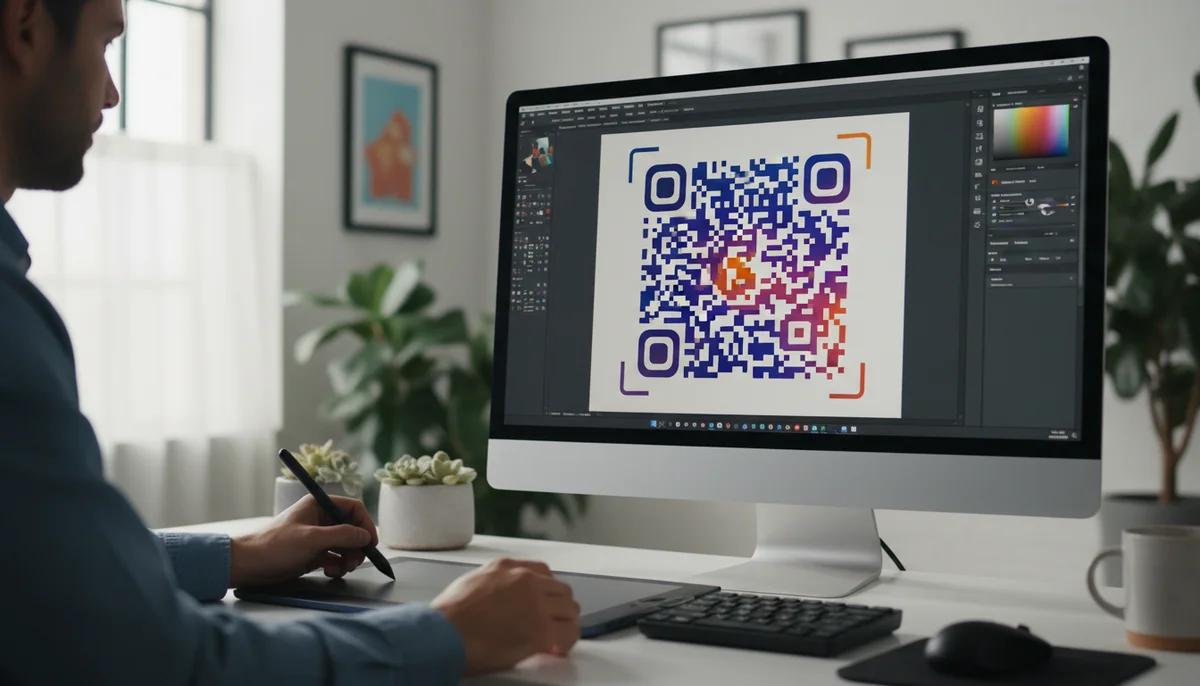
- Strategic Color Palette: While contrast is key, you can use your brand colors for the data modules and background. Just ensure the foreground is considerably darker than the background. For example, a dark brand blue on a light grey background can work beautifully. Avoid gradients within the code itself, as they can confuse scanners.
- Logo Integration: Placing your company logo or a relevant icon in the center of the QR code is a powerful branding move.
- Error Correction Level: To do this successfully, you need to generate your QR code with a higher error correction level (M, Q, or H). This allows the code to remain scannable even if a portion of its data (where your logo sits) is obscured. Level H (High) allows for up to 30% damage.
- Logo Size: Ensure your logo doesn't cover more than 20-30% of the QR code area. Test thoroughly to confirm scannability.
- Placement: Central placement is usually best.
- Borders: Consider giving your logo a clear, contrasting border to separate it from the QR modules.
- Custom Shapes & Patterns: Some advanced Custom QR Design tools allow you to modify the shape of the data modules (e.g., from squares to circles, rounded corners, or custom patterns) and the finder patterns (the three large squares in the corners).
- Caution: While visually appealing, extreme modifications can impair scannability. Always prioritize function over pure aesthetics. Subtle changes tend to be safer.
Crafting an Effective Call-to-Action (CTA)
A QR code without a clear purpose is like a door without a handle. A strong, concise Call-to-Action (CTA) guides users and encourages interaction.
- Clarity is Key: Tell users exactly what they'll get when they scan. Examples: "Scan for 15% Off," "Watch the Video," "View Our Menu," "Get Directions."
- Placement: The CTA should be prominently displayed directly above, below, or next to the QR code. It needs to be easy to read and visually distinct.
- Relevance: Ensure the CTA aligns perfectly with the content the QR code leads to. If it says "Scan for a Free eBook," make sure the landing page delivers exactly that.
- Examples of Effective CTAs:
- "Scan to Connect on Social Media" (leading to Social Media QR Codes)
- "Scan for Our Digital Menu" (for Restaurant Menu QR Codes)
- "Scan to Add to Contacts" (for vCard QR Codes)
- "Scan for Event Details" (for Event QR Codes)
Error Correction Levels: Your Design Safety Net
Error correction (EC) is a built-in feature of QR codes that allows them to be scanned even if they are partially damaged or obscured. There are four levels:
- Level L (Low): 7% of codewords can be restored. Creates a less dense code, but less resilient to damage.
- Level M (Medium): 15% of codewords can be restored. A good balance for most applications.
- Level Q (Quartile): 25% of codewords can be restored. Ideal for codes that will be customized with logos.
- Level H (High): 30% of codewords can be restored. Most resilient, but results in the densest, most complex-looking code pattern.
When applying "qr code design tips" like adding a logo or subtle pattern changes, opt for Level M, Q, or H. This provides the necessary buffer for your design modifications without compromising scannability. Remember, higher EC levels increase the data density, making the QR code look more complex, so choose the lowest level that supports your desired customization.
Strategy & Implementation: Beyond the Pixel
Designing a beautiful and scannable QR code is only half the battle. Strategic implementation and ongoing optimization are crucial for maximizing your return on investment.
Pre-Launch Testing: Scan, Scan, Scan!
This step is non-negotiable. No matter how confident you are in your design, thorough testing is essential.
- Multiple Devices: Test with a variety of smartphones (iOS and Android) and different QR code scanning apps. Some older devices or apps might be less forgiving of design modifications.
- Diverse Conditions: Scan the code in different lighting conditions (bright sun, low light), on different surfaces, and from varying distances.
- Print Samples: If printing, always print a few test copies on the actual material (e.g., glossy paper, matte finish, fabric) to ensure they scan correctly before committing to a large print run.
- Content Verification: After scanning, always double-check that the QR code leads to the correct destination URL and that the content is rendering properly on mobile devices.
Strategic Placement: Where Your QR Code Shines
The physical or digital placement of your QR code profoundly impacts its visibility and scannability.
- Visibility & Accessibility: Place QR codes at eye level and in easily accessible locations where users have enough time and space to scan. Avoid placing them in areas that require awkward stretching or quick glances (e.g., fast-moving vehicles).
- Contextual Relevance: The QR code should appear naturally within its environment. A QR code on a poster about an upcoming concert should link to event details or ticket sales. A QR code on a product should link to product information, reviews, or customer support.
- Examples:
- Retail: On product packaging (Product QR Codes), shelf tags, in-store displays for customer loyalty programs or exclusive offers (Coupon QR Codes).
- Marketing Materials: On flyers, brochures, business cards, posters for website visits (URL QR Codes), social media links, or contact info (vCard QR Codes).
- Restaurants: On tables for digital menus (Restaurant Menu QR Codes) or feedback forms.
- Events: On tickets, signage, or programs for schedules, maps, or speaker bios.
- Digital Screens: On presentations, digital billboards, or website banners. Ensure the refresh rate of the screen is slow enough for scanning.
Tracking and Optimization with QR Code Analytics
The true power of dynamic QR codes lies in their ability to provide actionable data. Robust analytics are crucial for any successful QR code marketing campaign.
- Key Metrics: Track total scans, unique scans, scan locations (city/country), time of day, and device types (iOS/Android).
- Performance Insights: Understand which QR codes are performing best, identify peak scanning times, and discover geographical hotspots. This data is invaluable for refining your "qr code design tips" and deployment strategies.
- A/B Testing: Use analytics to conduct A/B tests on different QR code designs, CTAs, or placements. For instance, test a QR code with a logo against one without, or try different color schemes to see which performs better.
- Real-time Adjustments: If a campaign isn't performing as expected, dynamic QR codes allow you to change the destination content or even the design (if you generate a new code and replace it) without recalling physical materials.
Efficient Workflow: Using a Free QR Code Generator and Team Tools
Managing multiple QR code campaigns efficiently requires the right tools. A reliable QR code generator is your central hub for creating, customizing, and managing your codes.
- Ease of Use: A good Free QR Code Generator should offer an intuitive interface for creating various types of QR codes, from simple URL links to complex business pages (Business Page QR Codes) or app downloads (App Store QR Codes).
- Customization Features: Look for generators that offer robust Custom QR Design options, allowing you to easily adjust colors, add logos, and select error correction levels without needing graphic design expertise.
- Team Collaboration: For larger organizations or agencies, a Team Workspace is invaluable. It allows multiple users to create, manage, and monitor QR codes collaboratively, ensuring brand consistency and streamlined campaign management.
- Bulk Generation: If you need to create hundreds or thousands of unique QR codes (e.g., for product serialization or personalized marketing), a Bulk QR Generator can automate the process, saving significant time and effort.
Conclusion
Effective QR code design is a powerful blend of technical precision and creative branding. By adhering to these qr code design tips, from ensuring optimal contrast and a clear quiet zone to strategically integrating your brand identity and leveraging dynamic capabilities with analytics, you can transform simple squares into highly engaging and conversion-driving assets.
Remember, the goal is always to create a seamless user experience that encourages interaction and delivers value. Invest time in thoughtful design, thorough testing, and ongoing optimization, and your QR code campaigns will not only look professional but also achieve exceptional results in bridging the gap between your physical presence and digital engagement. Start designing smarter, more impactful QR codes today and unlock their full potential for your marketing efforts.
Ready to Get Started?
Explore our tools to enhance your QR code workflow
Free QR Code Generator
Create unlimited QR codes for free with our easy-to-use generator. No signup required.
Start CreatingTeam Workspace
Collaborate with your team on QR code projects. Share templates, manage permissions, and track usage.
Explore TeamsBulk QR Generator
Generate hundreds of QR codes at once from CSV files. Perfect for events, inventory, and mass campaigns.
Start BulkAll tools are available with a free plan to get you started
Frequently Asked Questions
Find quick answers to common questions about this topic
How to make a QR code scannable?
Ensure sufficient contrast between the QR code and its background, maintain adequate size for scanning distance, and leave proper quiet zones around the code for optimal readability.
Can I brand my QR code?
Yes, you can brand your QR code by incorporating logos, custom colors, and unique shapes, as long as it does not compromise scanability. QR-Build allows extensive customization.
What is the optimal size for a QR code?
The optimal size depends on the scanning distance. A general rule is that the QR code should be at least 1x1 inch for short distances, increasing for longer distances.
What is a quiet zone in QR codes?
A quiet zone is the blank, clear border surrounding the QR code. It's crucial for scanners to distinguish the code from its surroundings and typically requires a minimum of four modules wide.
How do colors affect QR code scannability?
Colors significantly impact scannability. Use dark colors for the QR code and light colors for the background to ensure high contrast. Avoid similar color tones that blend together.
Related Articles
Continue exploring QR code strategies and best practices
Static vs Dynamic QR Code Explained: Benefits of Dynamic QR
Understand static vs. dynamic QR codes. Learn the benefits of dynamic QR codes for marketing, tracking, and content updates. Essential for modern campaigns.
How Dynamic QR Codes Work: Your Guide to Editable QR Codes
Discover how dynamic QR codes allow you to update content even after printing. Learn the benefits of an editable QR code for campaigns, menus, and business.
Boost Your Brand: How to Use a Custom QR Code Domain
Discover how a custom QR code domain elevates your brand's professionalism and user trust. Learn to set up and leverage a custom QR code domain for all your marketing and
Unlock Growth: QR Codes in Business for Modern Engagement
Discover how QR codes revolutionize business operations, marketing, and customer engagement. Explore essential QR code business uses to drive efficiency and boost your br
Unlocking Insights: How QR Code Analytics Boost Marketing Campaigns
Discover how QR code analytics provide real-time insights into user engagement, scan locations, and campaign performance. Optimize your marketing strategies with powerful
Boost Your Business: Creative QR Code Marketing Ideas for Success
Uncover 15 innovative QR code marketing ideas to transform your campaigns and engage customers. Learn how to leverage QR codes for promotions, lead generation, and enhanc

QR Technology Specialist
Sarah has over 8 years of experience in digital marketing and QR code technology. She specializes in helping businesses implement effective QR code strategies.