How to Use QR Code Feedback Forms to Boost Customer Insights
Boost customer insights with QR code feedback forms. Learn how to easily create dynamic QR codes for surveys, collect real-time feedback, and improve your service.
QR Codes for Customer Feedback Forms
In today's experience economy, understanding your customer is paramount. Businesses thrive on insights, and traditional feedback collection methods often fall short, struggling with low response rates, manual data entry, and delayed insights. This challenge has paved the way for a modern, efficient solution: the qr code feedback form. By bridging the physical and digital worlds, QR codes offer a seamless, instant channel for customers to share their thoughts, revolutionizing how businesses gather crucial intelligence.
This article explores how integrating QR codes into your feedback strategy can elevate customer experience, streamline data collection, and provide actionable insights in real-time. We'll delve into the mechanics, best practices, and strategic implementation of QR code feedback forms to help your business unlock its full potential.
The Power of a QR Code Feedback Form
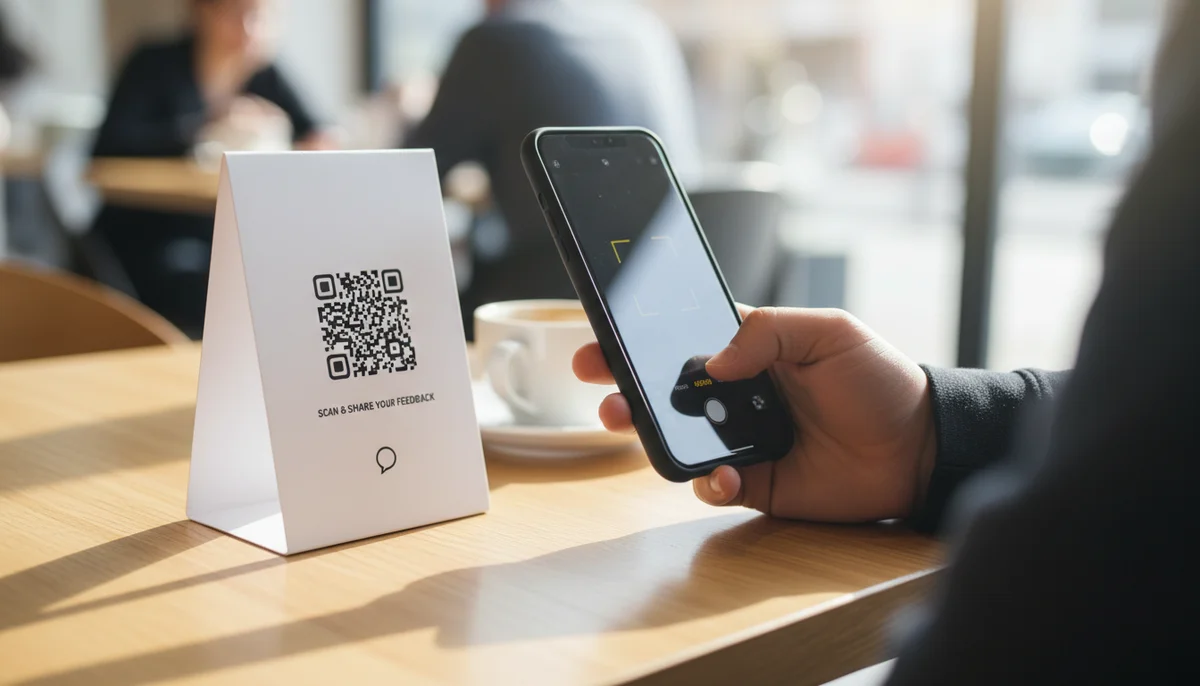
A qr code feedback form isn't just a digital survey; it's a direct, contextual gateway to your customer's mind. Imagine a diner finishing their meal, scanning a code on the table, and instantly providing feedback about their experience. Or a retail customer in a changing room, scanning a code to comment on product availability or staff assistance. This immediate, in-the-moment feedback is invaluable because it captures sentiments when they are freshest and most relevant.
The core power lies in its simplicity. Customers don't need to navigate complex URLs, download apps, or wait to get home to jot down an email. A quick scan with their smartphone camera transports them directly to a feedback form, minimizing friction and maximizing the likelihood of participation. This directness fosters a sense of being heard, strengthening customer loyalty and providing businesses with authentic, unvarnished opinions crucial for continuous improvement.
Key Benefits of Implementing QR Code Feedback Forms
Integrating QR codes into your customer feedback strategy offers a host of distinct advantages, moving beyond the general benefits of digital forms to leverage the unique capabilities of QR technology.
- Unrivaled Accessibility & Convenience: Customers simply point their smartphone camera at the code. This eliminates typing long URLs or searching for specific feedback pages, making the process incredibly easy and accessible from virtually any location.
- In-the-Moment Contextual Feedback: QR codes excel at capturing feedback precisely when the experience is happening. Whether it's a post-purchase impression, an event attendee's immediate reaction, or a service user's review, the direct link between the physical interaction and the digital feedback form ensures highly relevant and accurate data. This "moment of truth" capture is a game-changer for understanding genuine customer sentiment.
- Boosted Response Rates: The ease of use and immediate accessibility significantly increase participation. When customers don't have to go out of their way, they are far more likely to engage, leading to a richer volume of data compared to traditional methods.
- Real-time Data & Actionable Insights: Unlike paper forms that require manual collection and data entry, QR code feedback forms deliver responses directly to your analytics dashboard. This real-time stream of data allows for swift analysis and the ability to identify trends, pinpoint issues, and implement solutions much faster. While we don't link directly to our sign-in page, the power of QR code analytics lies in understanding scan rates, locations, and device types, further enriching your data.
- Cost-Effectiveness & Sustainability: QR codes replace the need for printing thousands of paper forms, reducing material costs and contributing to a greener operation. Updates to the feedback form can be made instantly without reprinting, saving both time and money.
- Enhanced Customer Experience: Offering a modern, tech-forward way to provide feedback shows customers that their opinions are valued and that the business is committed to convenience and innovation. This positive interaction reinforces brand perception.
Dynamic vs. Static QR Codes for Feedback
When deploying a qr code feedback form, understanding the difference between dynamic and static QR codes is crucial.
- Static QR Codes: These codes embed the destination URL directly. Once generated, the URL cannot be changed. If your feedback form's link ever updates, you'd need to generate and replace all your static QR codes. They offer no tracking capabilities for scans. While suitable for permanent links, their inflexibility makes them less ideal for evolving feedback campaigns.
- Dynamic QR Codes: This is the superior choice for feedback forms. A dynamic QR code stores a short URL that redirects to your actual feedback form link. This means you can change the destination URL at any time without altering the physical QR code itself. If your survey provider changes, or you update your form, simply log into your dashboard and update the link associated with your existing QR code.
The advantages of Dynamic QR Codes are clear:
- Flexibility: Update the linked form or survey whenever needed. This is invaluable for A/B testing different feedback forms or rotating seasonal surveys.
- Tracking & Analytics: Dynamic QR codes enable you to track valuable metrics such as the number of scans, location of scans, and devices used. This data provides deeper insights into your QR code campaigns and helps optimize placement and engagement strategies.
- Professionalism: A single, consistent QR code across all your marketing materials, even as your underlying content evolves, maintains a professional and organized brand image.
For any serious qr code feedback form strategy, leveraging a reliable QR code generator that supports Dynamic QR Codes is a non-negotiable. Our platform, for example, offers robust Dynamic QR Codes capabilities designed to empower your feedback initiatives.
Real-World Applications: Where to Use Your QR Code Feedback Form
The versatility of a qr code feedback form allows it to be integrated across nearly every touchpoint in the customer journey. Here are some practical examples:
- Restaurants & Cafes:
- Table Tents & Placemats: After a meal, a QR code invites diners to rate their food, service, and ambiance.
- Receipts: Print a QR code at the bottom of customer receipts for post-transaction feedback, potentially offering a discount on their next visit. For high-volume printing like this, a
Bulk QR Generatorcan produce hundreds or thousands of unique, trackable QR codes efficiently. - Restroom Doors: Gather feedback on cleanliness and facilities.
- Tip: Consider using
Restaurant Menu QR Codesto not only display your menu but also link to feedback forms seamlessly.
- Retail Stores:
- Point of Sale (POS): Capture immediate feedback about the checkout experience or product availability.
- Fitting Rooms: Solicit opinions on product fit, style, and store environment.
- Product Packaging: A QR code on a product label can link to a review form after a customer has had time to use the item, gathering valuable insights for product development.
- In-store Displays: Encourage feedback on visual merchandising or promotional offers.
- Events & Conferences:
- Badges & Lanyards: Attendees can scan to rate individual sessions, speakers, or the overall event experience.
- Brochures & Agendas: Collect feedback on content relevance and organization.
- Presentation Slides: Display a QR code at the end of a presentation for immediate speaker evaluation.
- Exhibition Booths: Understand visitor interest and lead quality.
- Service Industries (Hotels, Salons, Repair Shops):
- Hotel Room Key Cards/Welcome Packets: Ask guests about their stay, room quality, and amenities.
- Salon Stations: Gather feedback on stylist performance and service satisfaction.
- Invoices/Work Orders: Post-service feedback on technician professionalism and job completion.
- Service Vehicles: For home services, a QR code on a technician's uniform or vehicle can solicit feedback on their visit.
- Public Spaces & Transportation:
- Museum Exhibits: Collect opinions on displays and visitor engagement.
- Public Transport: Ask commuters about service quality, cleanliness, and punctuality.
- Kiosks & Information Boards: Gauge user experience and information clarity.
Crafting the Perfect QR Code Feedback Form
Creating an effective feedback form is just as important as the QR code itself. Here’s how to maximize its impact:
- Keep it Concise: Respect your customers' time. Aim for 3-7 questions focusing on key areas. Long forms lead to abandonment.
- Ask Relevant Questions: Tailor questions to the context. A restaurant form needs to ask about food and service, not product packaging.
- Mix Question Types: Use a combination of rating scales (1-5 stars), multiple-choice, and a few open-ended text fields for qualitative insights.
- Offer Incentives (Optional): A small discount, entry into a prize draw, or a freebie can significantly boost response rates. Clearly state the incentive on the accompanying call-to-action.
- Branding: Ensure your feedback form is consistent with your brand's colors, logo, and tone of voice. This creates a professional and trustworthy experience.
Understanding Form QR Codes vs. URL QR Codes:
It's important to distinguish between using a generic URL QR Code to link to an existing online survey (like Google Forms, SurveyMonkey) and using a dedicated Form QR Codes feature.
- URL QR Code: This is simply a QR code that points to any web address. If you already have a survey hosted elsewhere, you'd use a
URL QR Codeto direct users to it. This offers flexibility if you prefer a specific third-party survey tool. - Form QR Code: Many advanced
QR code generatorplatforms offer a built-in "Form" QR code type. This means you can create and host your feedback form directly within the QR code generator's dashboard. This integrated approach can simplify management, often comes with built-in analytics, and allows for direct integration with other platform features. Using a dedicatedForm QR Codessolution streamlines the entire process, from form creation to data collection, all within one ecosystem, providing a more robust and unified experience for businesses without needing to juggle multiple external tools.
Step-by-Step: Creating Your QR Code Feedback Form
Ready to implement your own qr code feedback form? Here's a straightforward guide:
- Design Your Feedback Form: Whether you use a third-party survey tool (like Google Forms, SurveyMonkey, Typeform) or leverage the built-in form builder within a
QR code generatorlike ours, first craft your questions. Focus on clarity, conciseness, and relevance. If using a dedicatedForm QR Codestype, you'll build your form directly on the platform. - Choose Your QR Code Generator: Select a reliable platform. For simple needs, a
Free QR Code Generatorcan get you started. For dynamic capabilities, analytics, and advanced features, opt for a professional service that offersDynamic QR Codes. - Select the "Form" or "URL" QR Code Type:
- If you've built your form on an external platform, choose "URL" and paste your form's web link.
- If your
QR code generatoroffers it, select "Form" and either build the form within the platform or link to a form you've already created there.
- Generate and Customize Your QR Code: Once your link or form is connected, generate your QR code. Most platforms allow
Custom QR Design, letting you incorporate your brand colors, logo, and unique patterns to make the code more appealing and trustworthy. - Test Thoroughly: Before deployment, scan your QR code with multiple devices and ensure it correctly redirects to your feedback form. Verify that the form functions perfectly on mobile.
- Deploy Strategically: Print your QR codes on physical materials or display them digitally. Ensure clear calls to action (e.g., "Scan here to give feedback," "Your opinion matters!").
Maximizing Response Rates and Insights
Creating the QR code is only half the battle. Maximizing its effectiveness requires a strategic approach to placement, promotion, and analysis.
- Visibility and Context are Key:
- Place QR codes where they are easily visible and make sense in the customer journey. On a receipt, near a product, or at an exit point are prime examples.
- Ensure there’s enough space around the QR code for easy scanning.
- Clear Call to Action (CTA): Don't just place a QR code; tell customers why they should scan it. "Scan for a chance to win," "Tell us about your experience," or "Help us improve" are effective CTAs.
- Promote the Benefits: Briefly explain how their feedback helps. Emphasize that it's quick and easy.
- Monitor Performance with Analytics: Regularly check your
QR code analytics(scan rates, times, locations) to understand engagement. This data helps you optimize placements and refine yourQR code marketingstrategies. If a code isn't performing, analyze why and make adjustments. - Act on Feedback: The most crucial step! Show customers that their input leads to real changes. This builds trust and encourages future participation.
Advanced Integration with the QR Code API
For large enterprises, SaaS companies, or businesses with unique operational workflows, the QR Code API offers a powerful solution to automate the generation and management of qr code feedback form campaigns at scale.
Through the API, you can programmatically:
- Generate QR Codes on Demand: Integrate QR code generation directly into your existing systems (CRM, ERP, ticketing platforms). For instance, automatically generate a unique QR code for each customer support ticket closure, linking to a specific feedback form for that interaction.
- Automate Feedback Requests: Trigger QR code creation and delivery (e.g., via email, in-app notifications) based on specific customer actions or milestones.
- Manage Dynamic Links: Programmatically update the destination URL for thousands of
Dynamic QR Codessimultaneously, ensuring your feedback forms are always current without manual intervention. - Access Analytics Data: Pull scan data directly into your business intelligence tools for deeper analysis and integration with other customer data sets.
This level of automation through the QR Code API transforms feedback collection from a manual task into a seamless, integrated component of your operational ecosystem, enabling unparalleled efficiency and data richness.
Conclusion
The qr code feedback form is no longer a novelty; it's an essential tool for any business committed to understanding and improving the customer experience. By leveraging the immediacy, accessibility, and data capabilities of QR codes, businesses can gather invaluable insights directly from their customers, precisely when and where it matters most. From boosting response rates and enabling real-time decision-making to offering a seamless, modern feedback channel, QR codes empower you to listen effectively and act decisively.
Ready to see what your customers really think? Start creating your dynamic QR code feedback form with QR-Build today and transform how you connect with your audience.
Frequently Asked Questions
Find quick answers to common questions about this topic
What is a QR code feedback form?
A QR code feedback form is a digital survey or questionnaire accessed by scanning a QR code, allowing customers to easily provide input on products, services, or their overall experience with a business.
How do QR code feedback forms improve customer experience?
They make giving feedback quick and convenient for customers, leading to higher response rates and enabling businesses to gather valuable insights more efficiently to improve services and satisfaction.
Can I edit a QR code feedback form after printing?
Yes, by using dynamic QR codes from platforms like QR-Build, you can update the linked feedback form content or destination anytime, even after the QR code has been printed and distributed.
How can I track responses from QR code feedback forms?
Platforms like QR-Build provide real-time scan analytics and detailed response tracking for your QR code feedback forms, showing when and where feedback was submitted, allowing for data-driven improvements.
What types of businesses can use QR code feedback forms?
Many businesses can benefit, including restaurants for service reviews, retail stores for product feedback, event organizers for attendee satisfaction, and service providers for client testimonials and suggestions.
Related Articles
Continue exploring QR code strategies and best practices

Dynamic QR Code Explained: What It Is, How It Works, & Benefits
Discover what a dynamic QR code is, how it works, and its key advantages for marketing and business. Learn why editable QR codes are essential for modern campaigns with Q

How to Track QR Code Scans for Campaign Success
Learn how to track QR code scans effectively with real-time analytics to measure campaign performance and optimize your marketing efforts. Understand key metrics.

How to Create an Editable QR Code for Google Reviews
Learn how to easily create an editable QR code for Google Reviews with QR-Build. Drive more customer feedback and boost your online reputation effortlessly. Get started t

How QR Codes Increase Customer Engagement and Loyalty
Discover how dynamic QR codes drive customer engagement, loyalty, and interaction. Track campaign performance with real-time analytics from QR-Build. Start boosting engag

What is a QR Code? Understanding How QR Codes Work & Technology
Curious about QR codes? Discover what a QR code is and how it works. This guide explains the ingenious QR code technology, connecting physical to digital information effo
Comparing Dynamic QR Code Tools: Which Platform is Right for You?
Explore leading dynamic QR code tools and platforms. Compare features, analytics, and pricing to find the best solution for your business needs and marketing campaigns.

Product Marketing Manager
Emma helps businesses leverage QR codes for marketing campaigns. She has worked with over 200 companies to optimize their QR code implementations.