Transforming Learning: The Power of QR Code Education Use
Discover innovative QR code education use cases for schools and universities. Learn how QR codes enhance engagement, streamline administration, and improve learning exper
QR Codes for Schools and Education: Revolutionizing Learning and Administration
The landscape of education is constantly evolving, with technology playing an increasingly pivotal role in engaging students and streamlining administrative tasks. Among the myriad of digital tools available, QR codes have emerged as a surprisingly powerful and versatile solution for educators. From interactive lessons to efficient campus management, understanding effective qr code education use can transform how schools operate and how students learn.
This article explores the myriad ways QR codes can be integrated into the educational environment, providing practical examples, strategic insights, and a clear roadmap for implementation. Discover how these simple squares can unlock new possibilities, making learning more dynamic and administrative processes smoother for institutions of all sizes.
Introduction to QR Codes in the Academic Sphere
QR codes, or Quick Response codes, are two-dimensional barcodes that can be scanned by a smartphone or tablet camera. They act as digital gateways, instantly connecting physical materials to a wealth of online information. While initially popular in marketing, their utility extends profoundly into education, offering immediate access to digital resources without cumbersome typing.
For schools and educators, the potential for qr code education use is vast. They bridge the gap between traditional learning materials and the digital world, enhancing accessibility, engagement, and efficiency across various aspects of school life. This includes everything from making lessons more interactive to simplifying communication with parents and managing resources more effectively.
Core Educational Applications of QR Codes
Integrating QR codes into educational settings offers a modern approach to common challenges, enriching the learning experience and optimizing operational workflows.
Enhancing Classroom Engagement and Learning Resources
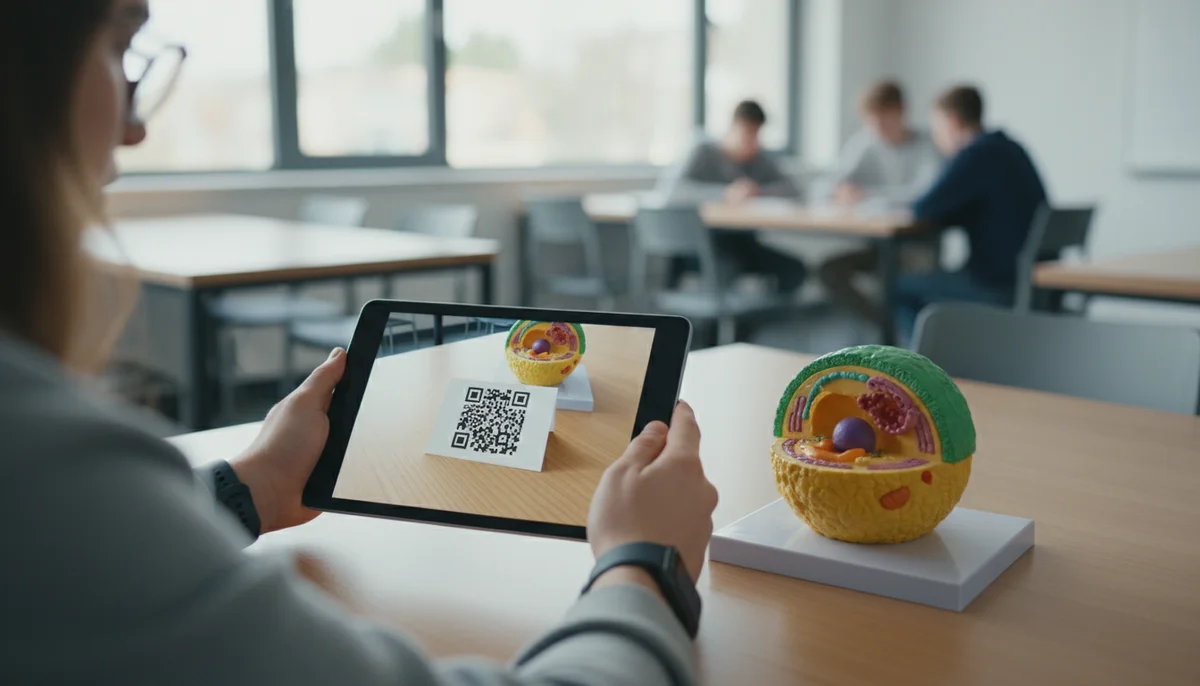
QR codes empower teachers to transform static content into dynamic, interactive experiences. Students can instantly access supplemental materials, multimedia, and self-assessment tools, fostering independent learning and exploration.
- Interactive Learning Stations: Set up different stations in the classroom, each with a QR code linking to a specific task, video explanation, or problem set. Students scan the code to begin their activity, promoting self-paced learning.
- Multimedia Integration: Attach QR codes to textbooks, worksheets, or lab equipment. Scanning the code could lead to:
- Educational videos or simulations explaining complex concepts.
- Audio files for language learning or story narration.
- Virtual tours of historical sites or scientific facilities.
- Interactive quizzes or flashcards for self-review. A Video QR Code can be particularly impactful for bringing lessons to life.
- Augmented Reality (AR) Experiences: Link QR codes to AR apps that overlay digital content onto the real world, such as 3D models of molecules or historical figures appearing in the classroom.
- Research and Project Support: Provide students with a Link List QR Code that directs them to curated resources, articles, and websites for research projects, ensuring they access reliable information.
Streamlining Administrative Tasks and Campus Operations
Beyond the classroom, QR codes offer significant advantages for school administration, helping to automate routine tasks, improve communication, and enhance security.
- Attendance Tracking: Students can scan a QR code upon entering a classroom or school event, automatically logging their attendance. This reduces manual effort and provides accurate records.
- Library Management: Place QR codes on library books. Scanning could reveal availability, summaries, reader reviews, or direct to an online reservation system.
- Resource Management: Tag school equipment (laptops, projectors, sports gear) with QR codes that link to inventory databases, maintenance logs, or borrowing forms.
- Visitor Management: Visitors can scan a QR code at the entrance to pre-register or check in, simplifying the sign-in process and improving campus security.
- School Cafeteria Menus: Display a QR code linking to the daily or weekly cafeteria menu, complete with nutritional information and allergen warnings, making it easily accessible for students and parents. A Restaurant Menu QR Code can serve this purpose perfectly.
Enhancing Communication and Safety
Effective communication is vital in any educational institution. QR codes provide a quick and convenient channel for sharing information with students, parents, and staff, especially in critical situations.
- Parent-Teacher Communication: Share QR codes at school events or on newsletters that link directly to teacher contact information, class schedules, or an online sign-up sheet for parent-teacher conferences.
- Emergency Information: Post QR codes in strategic locations around campus. In an emergency, scanning the code could provide immediate access to evacuation routes, emergency contact numbers, or specific instructions.
- Event Information: For school plays, sports events, or open houses, QR codes on posters or tickets can lead to detailed event schedules, venue maps (Location QR Code), or performer bios.
- Permission Slips and Forms: Instead of paper forms, use Form QR Codes on notices. Parents can scan, fill out, and submit permission slips or registration forms digitally, saving paper and administrative time.
Practical Examples of QR Code Education Use
Let's delve into specific scenarios where QR codes can be implemented, offering step-by-step guidance.
Example 1: Creating an Interactive Scavenger Hunt for a History Lesson
Imagine a history class studying ancient civilizations. Instead of a traditional lecture, students engage in an interactive scavenger hunt.
Steps:
- Identify Key Artifacts/Topics: Select 10-15 key historical figures, events, or artifacts relevant to the lesson.
- Gather Digital Content: For each item, find a short video, a historical document (PDF), an interactive map, or an audio clip that provides additional context.
- Generate QR Codes:
- Use a Free QR Code Generator to create individual QR codes for each piece of digital content. For a PDF document, you'd use a PDF QR Code. For a video, a Video QR Code.
- Crucially, consider using Dynamic QR Codes. If you find a better video or updated information later, you can change the linked content without reprinting the QR code. This flexibility is invaluable.
- Print and Place: Print the QR codes and place them around the classroom or school hall, perhaps next to images of the artifacts or historical timelines.
- Provide Instructions: Give students a worksheet with questions corresponding to each QR code. They scan the code, access the information, and answer the questions.
- Track Engagement (Optional): If using dynamic QR codes, you can leverage QR Code Analytics to see which QR codes were scanned most frequently, indicating which topics garnered the most interest.
Example 2: Streamlining Student Feedback and Surveys
Collecting feedback from students or parents can be challenging. QR codes simplify the process.
Steps:
- Create Your Survey: Design a survey or feedback form using an online tool (Google Forms, SurveyMonkey, etc.).
- Generate a Form QR Code: Copy the shareable link for your online survey. Go to your QR code generator and select the "Form" or "URL" option. Paste the survey link to create a Form QR Code.
- Distribute the QR Code:
- Print the QR code on posters around the school.
- Include it in email newsletters to parents.
- Display it on a projector screen at the end of a lesson or event.
- Collect Feedback: Students or parents scan the code and are immediately directed to the survey.
- Analyze Results: Review the collected data to gain insights for improvement.
Example 3: Digital Student Portfolios
Students can showcase their work digitally, making it accessible and easily shareable.
Steps:
- Curate Student Work: For each student, gather examples of their best work – essays, art projects (as images), science experiment videos, audio recordings of presentations, etc.
- Upload to Cloud Storage: Upload these files to a secure cloud storage service (Google Drive, OneDrive, Dropbox). Ensure sharing settings are appropriate (e.g., "anyone with the link can view").
- Generate Individual QR Codes:
- For an image of an art project, use an Image QR Code.
- For an essay, a PDF QR Code or a URL QR code linking to a document.
- For a presentation video, a Video QR Code.
- Consider creating a single "Student Portfolio" webpage for each student that links to all their work, then generate a single URL QR code for that page.
- Attach to Student Profiles/Folders: Print the individual QR codes and attach them to a student's physical portfolio folder, report card, or even on a desk name tag.
- Share with Parents/Future Teachers: Parents can scan the code during parent-teacher conferences to instantly view their child's progress and achievements. Future teachers can scan to quickly get an overview of a new student's capabilities.
Strategy and Implementation for Successful QR Code Campaigns
To maximize the benefits of qr code education use, a thoughtful strategy is essential. It's not just about creating codes, but about effective deployment and management.
Choosing the Right QR Code Type: Static vs. Dynamic
The first strategic decision is often between static and dynamic QR codes.
- Static QR Codes: The destination URL is embedded directly into the code. Once printed, the destination cannot be changed. Best for permanent, unchanging information like a school's main website or a static text message. Our Free QR Code Generator can create these.
- Dynamic QR Codes: The code links to a short URL, which then redirects to the final destination. This means you can change the destination URL at any time without altering the physical QR code.
- Advantage for Schools: Dynamic codes are ideal for educational content that may need updates (e.g., syllabus changes, new research links, updated event details). They also allow for tracking scans.
- Recommendation: For most qr code education use cases, especially those intended for long-term use or potential updates, Dynamic QR Codes are highly recommended.
Essential Steps for Effective Implementation
- Define Clear Objectives: Before creating any QR code, identify what you want to achieve. Is it to increase student engagement, simplify attendance, or improve communication? Clear objectives guide your content and placement decisions.
- Content Creation: Ensure the digital content linked to your QR codes is high-quality, relevant, mobile-friendly, and accessible. Test all links thoroughly.
- Utilize a Reliable QR Code Generator: Choose a platform that offers various QR code types, customization options, and supports dynamic codes. Our platform provides a comprehensive Free QR Code Generator to get started.
- Design and Branding: While less critical than for commercial
qr code marketing, consider adding a school logo or specific colors to your QR codes for easy recognition. This creates a consistent look for yourqr code campaigns. - Placement and Size:
- Placement: Ensure codes are placed in easily visible and accessible locations where users have enough space to scan. Avoid placing them on curved surfaces or where they might be obscured.
- Size: The QR code must be large enough to be easily scanned, typically a minimum of 1 x 1 inch (2.5 x 2.5 cm) for print, but scale up for larger viewing distances.
- Provide Clear Instructions: Always include a brief call to action next to the QR code (e.g., "Scan for today's lesson," "Scan to view menu"). Not everyone is familiar with QR code usage.
- Test Thoroughly: Before widespread deployment, test all QR codes with different devices and scanning apps to ensure they work correctly and lead to the intended content.
- Monitor and Analyze: For dynamic QR codes, utilize
QR code analyticsto track scan rates, location, and device types. This data provides valuable insights into user engagement and helps optimize futureqr code campaigns. Our QR Code Analytics feature offers detailed insights into your code performance. - Security and Privacy: When linking to sensitive information or student data, ensure the linked platforms comply with relevant privacy regulations (e.g., FERPA in the US). For sharing information internally within a team, consider using a Team Workspace for secure collaboration.
Managing Large-Scale Deployments
For larger schools or districts planning extensive qr code education use, consider tools like a Bulk QR Generator. This allows you to create hundreds or thousands of unique QR codes at once, perfect for tagging library books, student ID cards, or inventory items efficiently.
Conclusion
The integration of QR codes into schools and educational institutions presents a powerful opportunity to modernize learning environments and enhance operational efficiency. From making lessons more interactive and accessible to streamlining administrative processes and improving communication, the practical applications of qr code education use are extensive and impactful.
By strategically adopting dynamic QR codes, leveraging robust QR Code Analytics, and utilizing a reliable Free QR Code Generator, educators can create a more engaging, efficient, and technologically advanced learning experience for students, staff, and parents alike. Embrace this simple yet potent technology to unlock new dimensions in education and prepare your institution for the demands of the digital age.
Ready to Get Started?
Explore our tools to enhance your QR code workflow
Free QR Code Generator
Create unlimited QR codes for free with our easy-to-use generator. No signup required.
Start CreatingTeam Workspace
Collaborate with your team on QR code projects. Share templates, manage permissions, and track usage.
Explore TeamsBulk QR Generator
Generate hundreds of QR codes at once from CSV files. Perfect for events, inventory, and mass campaigns.
Start BulkAll tools are available with a free plan to get you started
Frequently Asked Questions
Find quick answers to common questions about this topic
How can QR codes be used in the classroom?
QR codes can link to educational resources, interactive quizzes, assignment details, video lessons, and virtual tours, making learning more engaging and accessible for students.
Are dynamic QR codes better for schools than static ones?
Yes, dynamic QR codes are highly recommended for schools as they allow educators to update linked content (like lesson plans or event schedules) without reprinting the QR code, saving time and resources.
What are the benefits of using QR codes for school administration?
QR codes streamline administrative tasks by providing quick access to student information, attendance tracking, event registration, consent forms, and campus navigation, improving efficiency.
Can QR codes help with school event management?
Absolutely. QR codes can be used for event check-ins, program guides, interactive maps, feedback surveys, and sharing photos or videos from school events, enhancing the participant experience.
Is it easy to create and manage QR codes for multiple school departments?
Platforms like QR-Build offer team workspaces, making it easy for different school departments or educators to create, organize, and manage their QR codes centrally, with real-time tracking.
Related Articles
Continue exploring QR code strategies and best practices

Create a QR Code for PDF: The Ultimate PDF QR Code Generator Guide
Unlock easy document sharing! Learn how to generate a QR code for PDF files effortlessly. Our guide covers using a PDF QR code generator to enhance accessibility and dist
Static vs Dynamic QR Code Explained: Benefits of Dynamic QR
Understand static vs. dynamic QR codes. Learn the benefits of dynamic QR codes for marketing, tracking, and content updates. Essential for modern campaigns.

Create a QR Code for Your Website: The Ultimate Guide
Unlock easy access to your website with a QR code. Learn how to create a website QR code, customize it, and deploy it effectively to boost traffic and user engagement. Si

Event QR Code Generator Guide: Streamline Your Event Planning
Discover how to effortlessly create QR codes for your events using a powerful generator. This guide simplifies attendee management, ticket sales, and marketing for any ev
QR Code Security & Safety: Protecting Yourself from Malicious Scans
Discover essential tips for QR code security and safety. Learn how to identify malicious QR codes and protect your personal data from phishing and malware attacks. Stay s

Unpacking QR Code Adoption Statistics: Why They're Back in Business
Explore the latest QR code adoption statistics and discover why QR codes have made a powerful comeback. Learn about their versatile uses and how businesses leverage them

QR Technology Specialist
Sarah has over 8 years of experience in digital marketing and QR code technology. She specializes in helping businesses implement effective QR code strategies.